SRT Format Explained (With Real Example File)
If you’ve ever searched for “correct SRT format” or “SRT file example”, you probably just want one thing:
👉 A clear explanation of how an SRT file is structured — and a real working example.
In this guide, we’ll break down the exact SRT format structure, show you a real example file, explain common mistakes, and help you avoid formatting errors.
What Is an SRT File?
An SRT file (SubRip Subtitle file) is a plain text subtitle format used to display captions in video players like:
- YouTube
- VLC
- Media players
- Online video platforms
It contains:
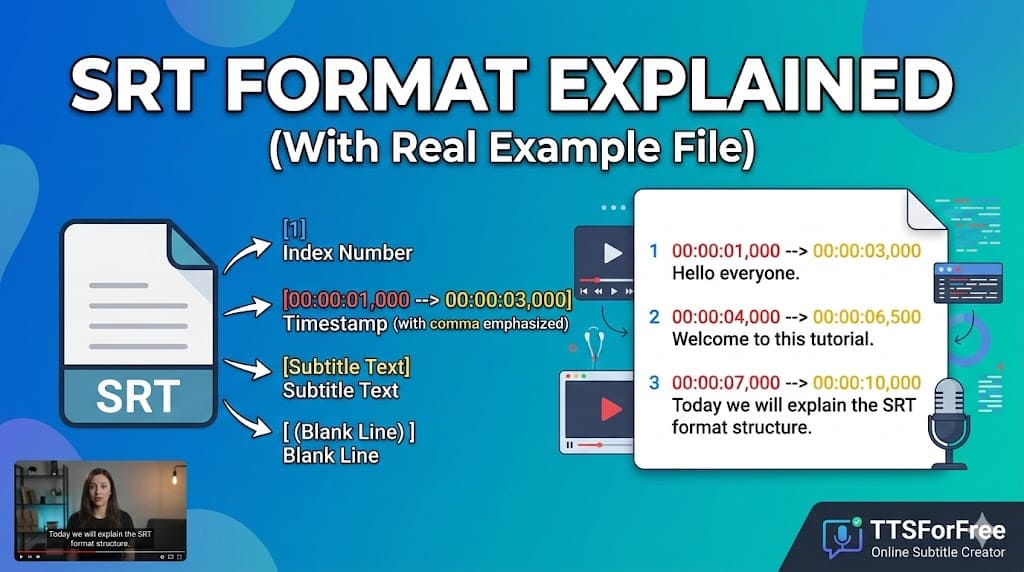
- Subtitle index number
- Timestamp (start and end time)
- Subtitle text
- A blank line
That’s it — but the formatting must be exact.
SRT Format Structure Explained
Each subtitle block in an SRT file follows this exact pattern:
Let’s break it down.
1️⃣ Subtitle Index Number
The index number:
- Starts from 1
- Increases sequentially
- Must not skip numbers
Example:
If numbering is incorrect, some players may fail to load subtitles properly.
2️⃣ Timestamp Format (Very Important)
The correct timestamp format is:
Example:
Rules:
- Use commas (,) for milliseconds — NOT dots
- Use 24-hour format
- Always include milliseconds (three digits)
- There must be spaces around the arrow -->
❌ Incorrect:
✔ Correct:
3️⃣ Subtitle Text
After the timestamp line:
- Write the subtitle text
- Can be one or two lines
- Avoid too many characters per line
- Do not include HTML unless supported
Then leave one blank line before the next subtitle block.
Real SRT File Example
Here is a complete working SRT example:
This file follows all correct SRT format rules:
- Proper numbering
- Valid timestamps
- Correct arrow formatting
- Blank line between entries
Common SRT Format Mistakes
Many users search for “SRT not working” because of small formatting errors.
Here are the most common issues:
❌ Using dots instead of commas
Milliseconds must use commas.
❌ Missing blank line between subtitles
Each subtitle block must be separated by one empty line.
❌ Overlapping timestamps
End time of subtitle 1 should not exceed start time of subtitle 2.
❌ Wrong encoding
SRT files should be saved as UTF-8 encoding, especially for non-English languages.
❌ Incorrect arrow format
Must be:
With spaces on both sides.
How to Create a Proper SRT File
There are two ways:
Manual Method
- Open Notepad
- Follow correct SRT structure
- Save file as
.srt - Choose UTF-8 encoding
This works — but manual timestamp formatting can be time-consuming.
Generate SRT Automatically (Recommended)
Instead of manually formatting timestamps, you can generate a properly structured SRT file automatically using a tool like:
👉 https://ttsforfree.com/en/video-to-srt/
With TTSForFree, you can:
- Upload MP4 or MP3
- Automatically generate correct SRT structure
- Configure subtitle line length
- Export ready-to-use SRT
- Restore previous subtitle jobs
This ensures your SRT format is technically correct without manual errors.
Edit, Translate, or Convert Your SRT
Once you have a properly formatted SRT file, you can:
- Edit subtitle text
- Automatically translate subtitles
- Manually refine translations
- Convert SRT to AI voice
You can use:
👉 https://ttsforfree.com/en/srt-to-speech/
This allows you to turn subtitles into voiceovers for:
- Dubbing
- Podcast production
- Accessibility
Final Thoughts
The SRT format is simple — but strict.
Every subtitle block must follow the correct structure:
- Index number
- Timestamp (with commas)
- Subtitle text
- Blank line
Even small formatting mistakes can break the file.
If you want to avoid manual errors, generating your SRT automatically using a dedicated tool ensures correct formatting every time.