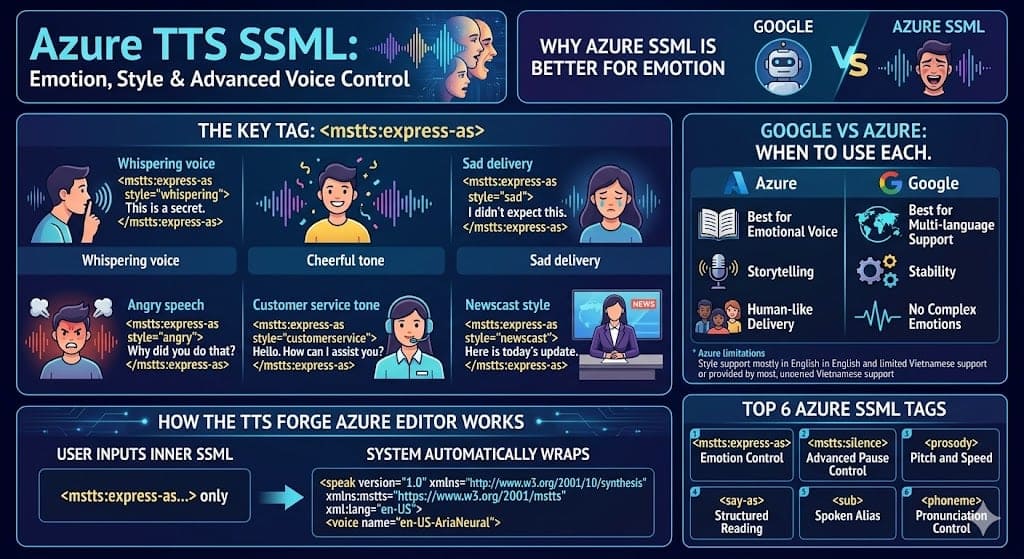
When you need emotional voice output, Azure SSML is the better choice
If Google SSML helps you control pacing and clarity, Azure SSML goes further by enabling emotion and speaking style control.
With Azure Text-to-Speech, you can create:
- whispering voice
- cheerful tone
- sad delivery
- angry speech
- customer service tone
- newscast style
This becomes especially important when working on:
- YouTube voiceovers
- storytelling / narration
- multi-character dialogue
- marketing videos
- AI voice acting
What is Azure TTS SSML?
Azure TTS SSML is an extension of standard SSML that introduces Microsoft-specific tags (mstts) for deeper voice control.
Unlike Google, Azure allows you to:
- control style (emotion)
- adjust styledegree (intensity)
- define role (character/voice personality)
Azure’s biggest strength: Emotion & Style
The most important tag:
<mstts:express-as>
You can create different emotional tones:
1. Whispering voice
2. Sad voice
3. Angry voice
👉 This level of emotional control is something Google TTS does not provide directly.
But Azure also has limitations
Despite being powerful, Azure has some constraints:
- Not all voices support styles
- Most emotional styles work best with English voices
- Some languages (like Vietnamese) have limited support
Google vs Azure: when to use each
Use Azure when:
- you need emotional voice
- you are building storytelling content
- you want more human-like delivery
Use Google when:
- you need multi-language support
- you want stability and consistency
- you don’t need complex emotions
👉 Best practice in real workflows:
- Google → general content
- Azure → important or emotional segments
How the Azure SSML Editor on TTSForFree works
Your Azure page is designed as an SSML-first workspace.
Key differences:
1. You only write inner SSML
You do NOT need to write <speak> or <voice>.
👉 The system automatically:
- wraps your content with
<speak> - adds the
msttsnamespace - injects the correct
<voice>based on your selection
2. Built-in toolbar for faster testing
You can quickly insert:
<mstts:express-as><mstts:silence><prosody><phoneme>
→ making testing much faster than writing everything manually
3. Ready-to-use presets
Example:
Cheerful intro
Customer service tone
Newscast style
Most important Azure SSML tags
1. <mstts:express-as> – emotion control
- core feature of Azure
- changes tone and style
2. <mstts:silence> – advanced pause control
👉 More precise than Google’s <break>
3. <prosody> – pitch and speed
4. <say-as> – structured reading
5. <sub> – spoken alias
6. <phoneme> – pronunciation control
Recommended Azure SSML workflow
- Write your script
- Add
<mstts:express-as>first - Test one style at a time
- Adjust
styledegree - Add prosody if needed
- Compare outputs
👉 Important tip:
Do not change too many things at once — it makes it harder to understand what improved.
Common mistakes
- using a voice that doesn’t support styles
- overusing emotion (sounds unnatural)
- mixing too many styles in one segment
- skipping step-by-step testing
- using Azure for heavy multi-language workflows
When should you use Azure SSML?
Azure is best for:
- storytelling
- emotional videos
- AI voice acting
- YouTube intros
- marketing scripts
What TTS Forge Azure helps you do
The dedicated Azure page helps you:
- test emotions quickly
- avoid writing full SSML manually
- stay focused on Azure voices only
- keep the same workflow as Text-to-Speech
Final thoughts
Azure TTS SSML is one of the most powerful tools available today if you need:
- emotional voice output
- voice acting
- expressive storytelling
However, it is not the best choice for every use case.
👉 In summary:
- Azure → strong in emotion (whisper, sad, angry)
- Google → strong in multi-language support
If used correctly, combining both can give you the best results.